A family piggy bank for kids and peace of mind for parents.

A piggy bank for kids. Pocket money saved for a goal of their own

Help your child learn about pocket money by putting it into practice. You add virtual family coins to their wallet, set the indicative rate, and see how they save towards goals they choose. When they are ready to ask for a reward, the decision is yours.

Clear rules for kids. Parents stay in control.

  • More than one child in a family
  • You set the indicative rate
  • Rewards need your approval
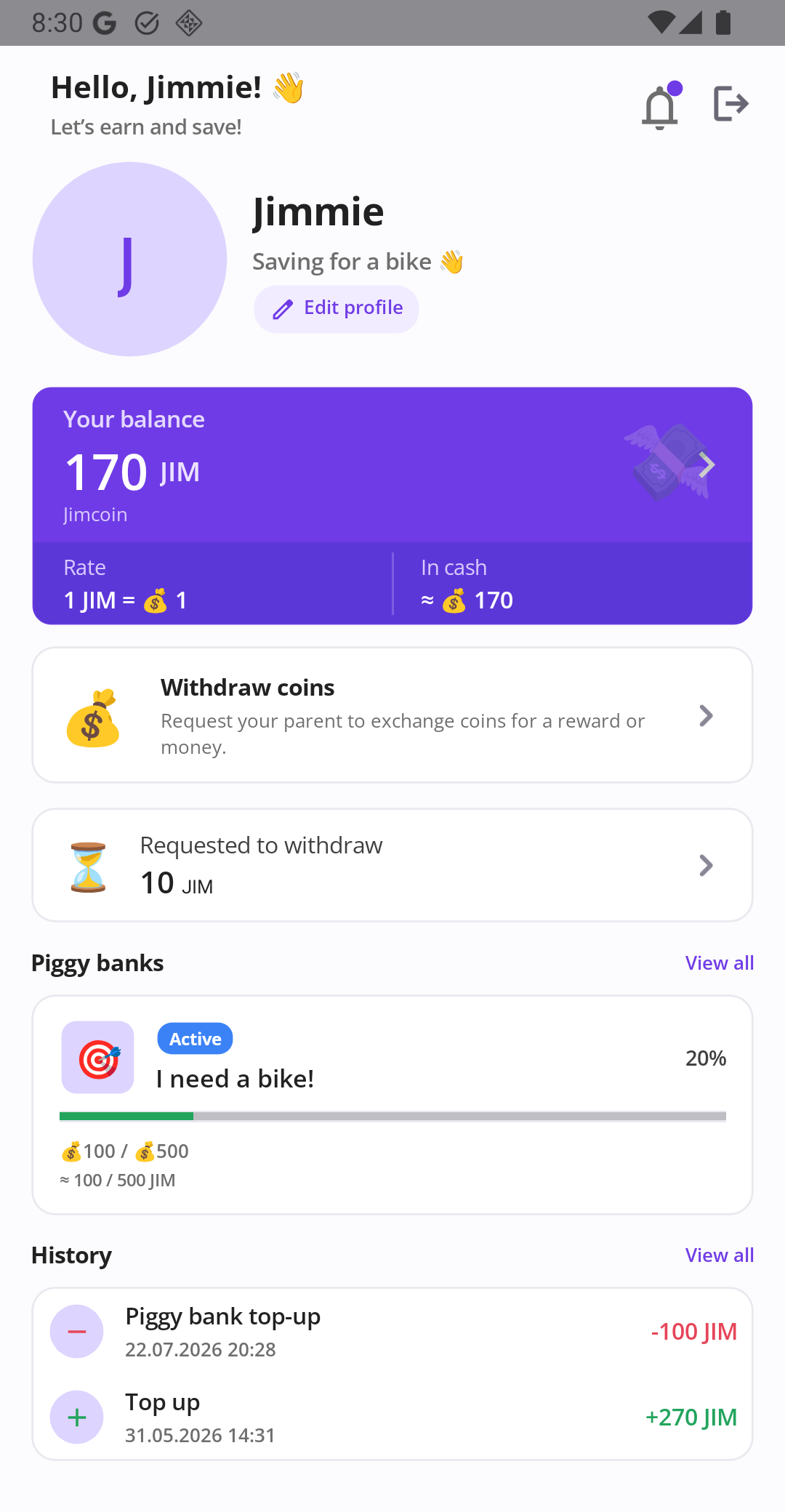
Banka child screen showing a virtual coin balance, indicative rate, and a savings goal for a bike with its progress.
See how a savings goal looks on your child’s phone.

How it works

Banka helps families make pocket money and savings goals easier to understand. You set the rules and make the decisions. Your child learns to plan, save, and follow their progress.

  1. 1

    You add virtual family coins

    Create your family coin: choose a name, a short code, and a symbol. Then add coins to your child’s wallet. They can see their balance and its estimated value in real-world money, based on the indicative rate you set.

  2. 2

    Your child saves for a goal they choose

    Your child chooses what they want to save for, enters the target price, and can add a photo. Banka calculates how many virtual coins are needed at the current indicative rate. Your child moves coins from their wallet into the piggy bank and follows the progress. If plans change, they can move coins back to the wallet.

  3. 3

    You decide on rewards and support

    The coin’s indicative rate is calculated using criteria you define. When your child wants a reward for their saved coins, they send you a request. You decide whether to approve or decline it. If you want to help them reach a goal sooner, you can add a parent boost to that specific piggy bank.

Important: Banka does not exchange coins for real money or transfer money. If you approve a reward request, you provide the agreed reward or arrange the purchase outside the app.

For parents

Banka does not make decisions for you. It makes family agreements about pocket money and saving visible to both you and your child. Financial literacy starts with practice: shared rules, personal goals, and progress your child can see.

  • Several children in one family. Each child has their own wallet and piggy banks.
  • You create the family coin. Choose its name, code, and symbol, then add coins to your child’s wallet. You can reverse a top-up if you entered the wrong amount.
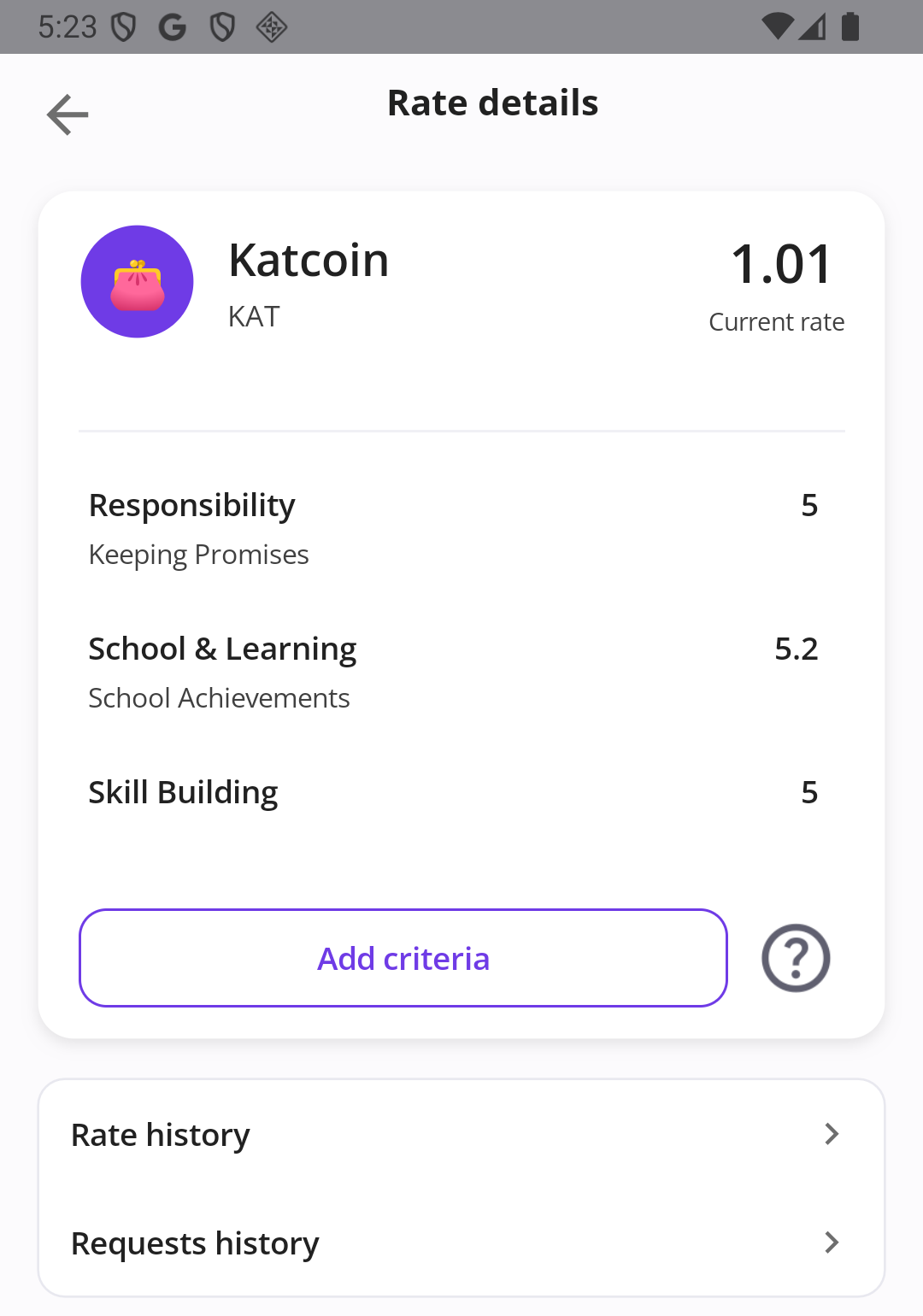
  • You set the indicative rate. The rate is calculated from criteria you define. Give each criterion a score from 1 to 5.5 and add a short comment if needed. Your child can see the criteria, scores, and rate history.
  • You review reward requests. Approve or decline a request. Ready-made decline reasons include “Too early”, “Not now”, “Too much”, and “Let’s discuss first”. You can also add your own comment of up to 120 characters.
  • You can boost a specific goal. Your child can ask for support, and you decide whether to apply it. The multiplier can be applied only once to a goal. If you decline, you can leave a comment.
  • You manage your child’s access. Parents sign in with an email address and password or with Google. Children do not need a password: under “Share access”, you can show a one-time QR code or send a link.
How the indicative rate is calculated

Total score ÷ number of criteria ÷ 5

With criterion scores from 1 to 5.5, the result ranges from 0.2 to 1.1. This is the indicative real-world value of one family coin, used by the app to calculate and display an estimate. It is not an exchange rate or a promise of payment.

Keep the list of criteria short. Change scores thoughtfully: the feature is intended to encourage family conversations, not to punish a child.

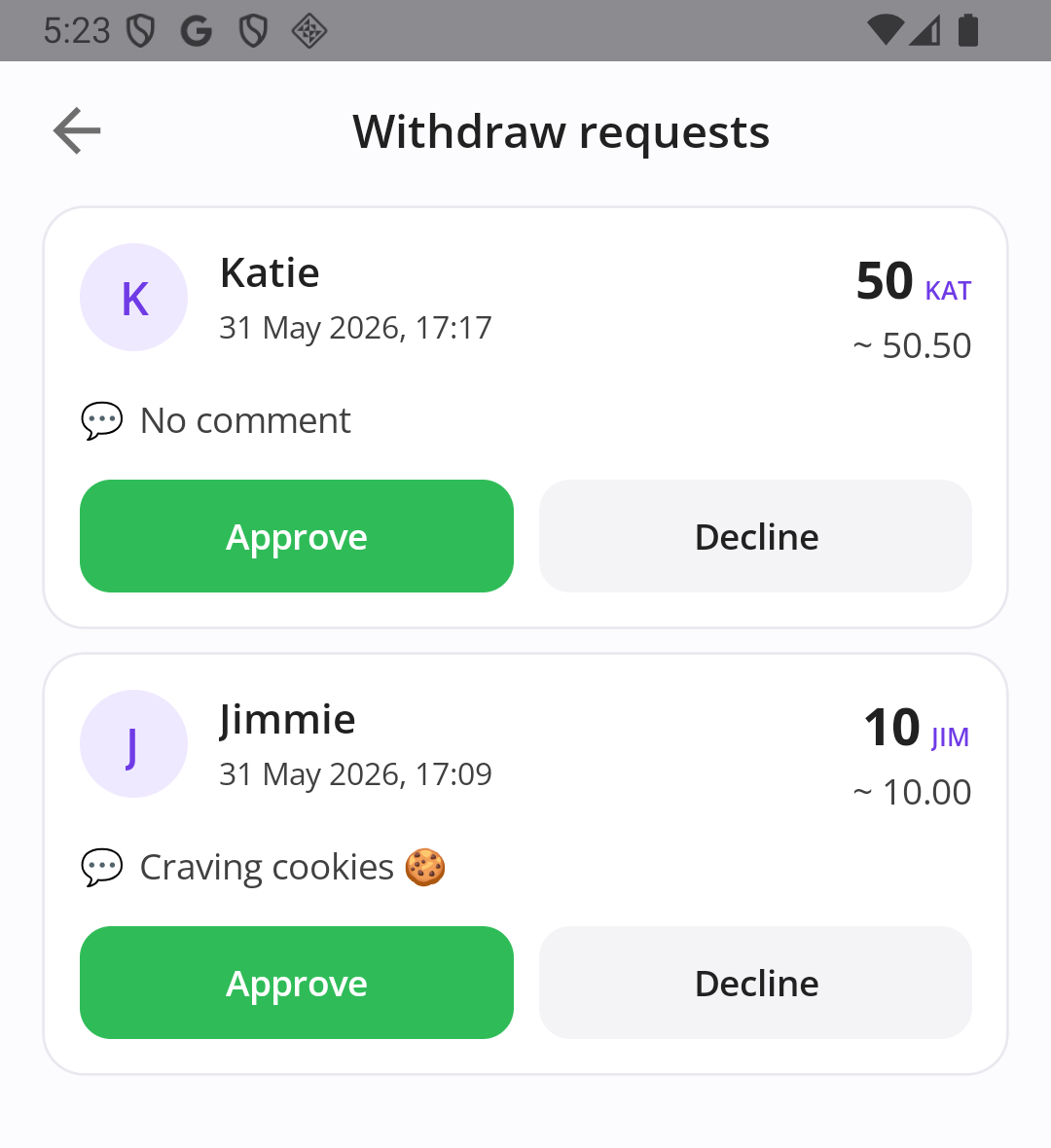
Parent screen showing a child’s reward request, the amount, the child’s comment, and options to approve or decline.
Your child’s request comes to you. You decide whether to approve it; Banka does not make a payment.
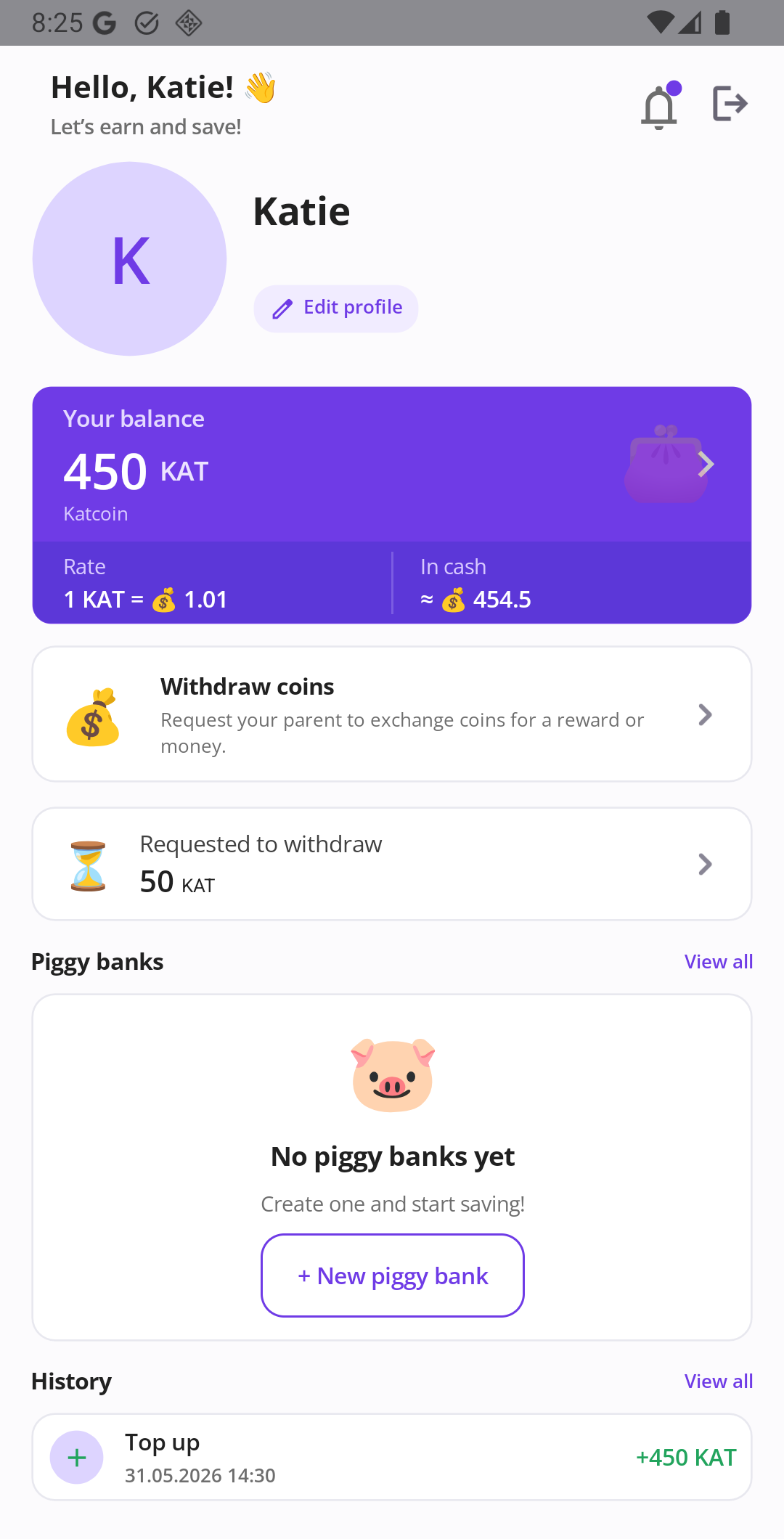
Child screen showing a virtual coin balance, indicative rate, and an option to create the first piggy bank.
Your balance, the indicative rate, and the button to create a new piggy bank.

For kids

If you are reading this yourself, here is how Banka works.

  • Your parents give you virtual coins. They are your family’s pocket money inside the app.
  • You can see how many coins you have and about how much they are worth in real-world money, using the rate your parents set.
  • You can make a piggy bank: choose what you want to save for, set a target price, and add a picture if you like.
  • Move coins from your wallet into your piggy bank and watch your progress grow. Changed your mind? You can move coins back to your wallet.
  • You can ask your parents to help with your goal.
  • When you want a reward for your savings, send your parents a request. They decide whether to say yes or no, and can explain why.
  • You sign in using a QR code or link from a parent. You do not need your own password.

This section is written for children. You still set the rules and make the decisions.

What’s in the app

These are features that are already available in the app.

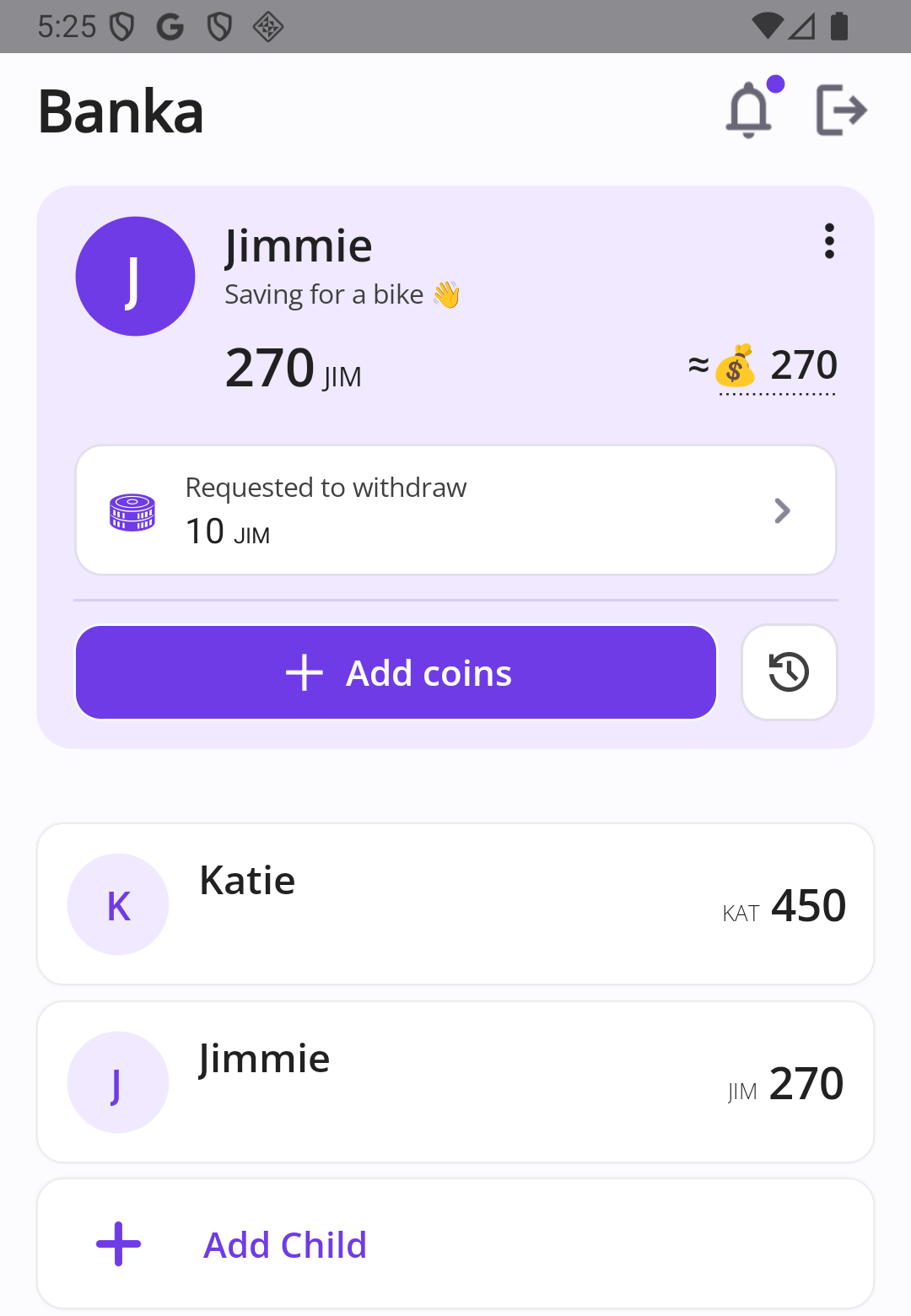
Banka parent home showing children’s balances, a pending request, the child list, and the option to add coins.
Parent home: Add coins and see your children’s balances and requests.
Family coin rate settings showing parent-defined criteria, scores, and the calculated indicative rate.
Indicative rate: The criteria and calculated value used to show the estimated real-world value of family coins.

Family coins

Choose the name, short code, and symbol for your family coin. Add virtual coins to your child’s wallet as their pocket money. The app shows the coin balance alongside its estimated value in real-world money, based on the indicative rate you set.

Piggy banks and savings goals

Your child sets a goal and enters its price in real-world money. Banka calculates how many virtual coins are needed at the current indicative rate. They can add a photo to the goal and track progress with a progress bar.

Parent boost

Your child can ask you to support a specific piggy bank. If you agree, you apply a multiplier greater than 1 once for that goal. Banka calculates the extra contribution using this formula:

Boost = child’s coins in the piggy bank × (multiplier − 1)

For example, with a multiplier of 1.5, every coin saved by your child is matched with an additional 0.5 coin from you. The same goal cannot receive a second multiplier.

An indicative rate with clear criteria

You define the criteria and enter a score and comment for each one. Your child can open the rate details to see how the current value is calculated. Previous rates are available in the history.

Reward requests

Your child sends you a request when they want a reward for their saved coins. You can approve or decline it. Your child cannot approve their own request. Banka records the request and your decision; it does not transfer real money or provide the reward.

History and notifications

Top-ups, piggy bank activity, and requests are kept in the app’s history. Relevant participants receive notifications about events that concern them, such as balance changes, requests, goals, and boosts.

Real money stays with you

Banka does not hold or transfer real money. Coins are virtual family records inside the app. They are not a bank deposit, electronic money, or a payment card.

Your child cannot change the indicative rate or approve their own reward request.

When your child asks for a reward, you make the decision. If you approve it, you provide the money or reward, or arrange the purchase yourself — outside the app.

When a savings goal is complete, you confirm it. Banka records how many coins the child saved and how much you added through the parent boost. The app does not make the purchase or hand over the reward.

If a piggy bank is cancelled, your child’s coins return to their wallet. The parent boost does not return to the wallet.

A child’s access code is one-time use. Once used, it cannot be used again. To start a new session, you create a new QR code or link.

A parent creates the family account. To delete it, first remove the child profiles in the app, then use the account deletion page.

For support: support@ubanka.com.

Before you install

Is Banka a bank or a kids’ debit card?

No. Banka is a family piggy bank on your phone. Virtual coins are not held in a bank account, cannot be transferred to another bank, and are not a payment method. They help your family keep track of pocket money and savings goals. Any real-world money or reward comes from you, if you decide to approve the child’s request and provide it.

How does pocket money reach my child?

You create a family coin and add it to your child’s wallet when you choose. The app does not automatically pay an allowance on a schedule. Your child can see the updated coin balance and its estimated value at the current indicative rate. If you make a top-up by mistake, you can reverse it.

Who sets the rate?

Only the parent. You can create criteria, give each one a score from 1 to 5.5, and explain your assessment. The app uses this formula: total score ÷ number of criteria ÷ 5. The result ranges from 0.2 to 1.1. Your child can see how the rate is calculated. Make changes thoughtfully: the feature is meant to encourage and support family agreements, not to punish.

How can parents help a child reach a goal?

Your child can ask for support on a specific piggy bank. If you agree, you apply a multiplier greater than 1 once. Banka calculates the additional virtual coins according to the app’s boost formula. You can decline and leave a comment. A second multiplier cannot be applied to the same goal.

What happens when the goal is reached?

The piggy bank waits for your confirmation. You confirm the goal and can leave a comment. Banka records the result and each contribution, but it does not send money or buy anything. You provide the bike, game, cash, or other reward yourself.

How does my child sign in without a password?

Open “Share access” and show your child a one-time QR code or send them a link. The code can be used once. For a new sign-in, you create a new QR code or link. Parents sign in with an email address and password or with Google.

Which phones does Banka work on? Can I add more than one child?

Banka is currently available for Android on Google Play. You can add several children to one family; each child has their own coins and piggy banks. The app is available in English and Russian.


Start your first piggy bank

Install Banka, add your child, and give them their first virtual coins. They can choose a goal, save towards it, and follow their progress. You can see what is happening and decide when and what reward to provide.

Get it on Google Play

Android · Google Play · English and Russian in the app